Figaro - or how we create the app we need
yuval bloch
A Hackathon for App Development
Over the last three months I’ve been part of developing MIRA — a Multilayer Interactive Rendering Application — which we’ve already presented as a preprint on arXiv. I wrote about how AI heavily shaped that development process on my blog, but the most important conclusion from the whole experience is this: small-to-medium app development has become genuinely easy, thanks both to AI and to the modern ecosystem of browser deployment tools and JavaScript libraries.
untli now was apps built only if there was a large enough pool of potential customers. Now we can build apps for our own specific needs, no matter how niche. MIRA, for instance, helps with a very particular step in a very particular area of scientific development. When our PI saw the potential, he wanted us to learn it firsthand: if you need a workflow tool that doesn’t exist, just build it. So he set up a hackathon-style competition, and my group developed Figaro.
You can try the beta here: ecological-complexity-lab.github.io/figaro-/ Or explore it as an R package on GitHub.
It’s still a work in progress — if you try it and notice something missing, I’d love to hear from you: yuvalblo@post.bgu.ac.il
The Problem Figaro Solves
Picture this: you’ve just completed a complex analysis — an ecological network, a gene transfer study — something that took real intellectual effort. The results are beautiful, and you’ve translated them into a rich dataset with plots built in R, because you’re a biologist and that’s where the ecosystem lives.
Then the real work begins. The layout wastes space. Labels are too small, too large, in the wrong font, overlapping each other. The dot shapes and color choices aren’t quite right. So you export to a vector editor and spend an hour tweaking — nudging, resizing, recoloring — until it finally looks right.
Then you sit down with your PI.
Mid-conversation, you both notice something: a questionable decision buried in the analysis. Maybe the threshold you used to distinguish rare species doesn’t hold up. You change one parameter, rerun everything — and suddenly you’re back at square one, doing the whole hour of manual editing again.
After the third time, you decide to do it properly: generate the figure correctly in R from the start. So now you need to tell ggplot to shift the title of subfigure D exactly two millimeters to the left so it doesn’t obscure the legend. Make subfigure C slightly larger than subfigure A. Lock the entire layout to the page width so nothing shifts on export. If you’ve ever tried this, you know it sits right at the edge of impossible.
The Vision
Now imagine a different world.
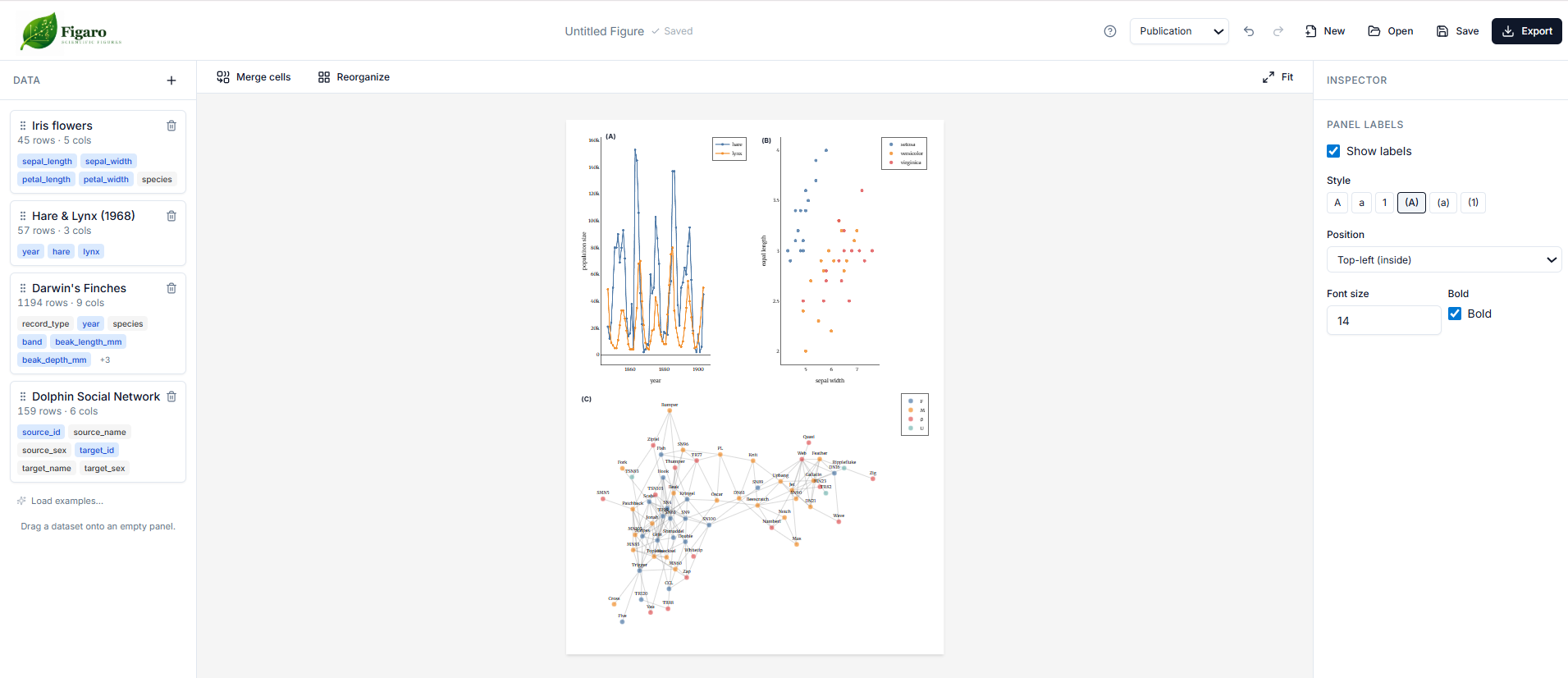
One application that is both vector editor and plot generator. You drag elements freely across your figures — and when the underlying data changes, every adjustment you’ve made is preserved. No re-exporting. No re-tweaking. No starting over.
Think about how much that time adds up to across a career. Time that could go toward the work that actually matters: understanding disease, confronting climate change, chasing nuclear fusion, unraveling the deep mysteries of the universe.
The Development Process
Working with AI
In app development there are two broad approaches, and the difference between them becomes much more pronounced when you’re working with AI:
- Sketch first, then iterate — tell the AI to build a rough draft, then add features one by one.
- Design completely, then build — fully define all features before writing a single line of code, create a comprehensive plan, then implement it. You’ll still tweak afterward, but the core is already solid.
Option 2 produces a much better architecture. That advantage matters even more with AI-driven development: if you’re coding on your own, you can get away with a vague vision because it lives in your head. But to communicate it to an AI, you have to define it precisely. AI also works best with short, focused context — the prompt you write before any code exists is the most powerful one you’ll write. Designing first also puts human decision-making first, which is the right hierarchy.
Working as a Team
This was probably the most fun — and the most frustrating — part of the process.
I was the most experienced developer. My colleagues brought their own strengths: Kesem, for example, is a genuinely talented graphic designer and a more experienced scientist, so she understood the field’s needs far better than I did.
The frustrating part of being the experienced one was feeling like I constantly needed to guide my colleagues through things I took for granted — using git from the terminal, npm, best practices with Claude. Unlike a team in industry, we also had no clear roles, so I kept shifting between mentor, equal partner and trainee, trying to ensure reasonable decisions on questions I knew well without seizing control in areas where we were all on equal footing.
The fun part was being in their territory. I had the opportunity to learn from them, and the brainstorming energy was something I genuinely enjoyed. In the next project, I think we’ll discuss roles as early as possible.
The Competition
We didn’t win. Another group — who built an app to help manage information for grant applications — took first place. I don’t feel bad about it. We designed something that could genuinely reduce a major headache for the scientific community, and grant applications are also a nightmare. Between our app, the grant management app, and a third group’s app for finding your next position, all alongside MIRA, the competition as a whole demonstrated the real power of tools tailored to specific needs.
The Internet We Deserve
In the Silicon Valley TV show, there’s a phrase they use to pitch their product: a shift from “the internet we have to the internet we deserve.” I think we’re standing at exactly that kind of threshold.
Until now, the world of apps was controlled by major economic forces. Now it can be shaped by us and our actual needs. So if you’ve built an app that improves your workflow, share it lets build this world togther .